
Last updated on
Nov 4, 2026

India New Form 11 - Declaration Form 2016-2026 free printable template
We are not affiliated with any brand or entity on this form

Fill out
Complete the form online in a simple drag-and-drop editor.

eSign
Add your legally binding signature or send the form for signing.

Share
Share the form via a link, letting anyone fill it out from any device.

Export
Download, print, email, or move the form to your cloud storage.
Why pdfFiller is the best tool for your documents and forms


End-to-end document management
From editing and signing to collaboration and tracking, pdfFiller has everything you need to get your documents done quickly and efficiently.
Accessible from anywhere
pdfFiller is fully cloud-based. This means you can edit, sign, and share documents from anywhere using your computer, smartphone, or tablet.
Secure and compliant
pdfFiller lets you securely manage documents following global laws like ESIGN, CCPA, and GDPR. It's also HIPAA and SOC 2 compliant.
What is India New Form 11 - Declaration Form
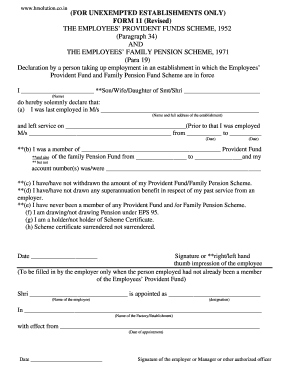
The EPF Declaration Form 11 is an employment document used by employees and employers in India to declare previous employment details and authorize the transfer of provident fund (PF) and pension scheme (EPS) details.
pdfFiller scores top ratings on review platforms




This was a life saver and very user friendly unlike other brands that I have tried!
It's great, albeit a bit expensive. Would prefer a buy it now once option... but so easy to use and does everything you need. Wayyy better than Adobe
Who needs India New Form 11 - Declaration Form?
Explore how professionals across industries use pdfFiller.

India New Form 11 - Declaration Form is needed by:
-
Employees joining a new establishment under EPF scheme
-
Employers managing employee transitions and fund transfers
-
HR professionals facilitating employee onboarding
-
Payroll administrators handling provident fund matters
-
Finance departments responsible for employee funding
-
Legal advisors assisting with employment-related documentation
Comprehensive Guide to India New Form 11 - Declaration Form
What is the EPF Declaration Form 11?
The EPF Declaration Form 11 is a crucial document used in India within the Employees' Provident Fund Scheme and the Employees' Pension Scheme. This form facilitates the declaration of previous employment details, allowing for the smooth transfer of provident fund (PF) and pension scheme (EPS) benefits. It requires essential personal information and previous PF account details from employees to ensure accurate processing.
The form acts as a formal request to transfer PF benefits securely, supporting the transition of employees who join new organizations under the relevant schemes.
Purpose and Benefits of the EPF Declaration Form 11
The primary purpose of the EPF Declaration Form 11 is to enable employees to declare their past employment records for an efficient transfer of their PF and EPS benefits when changing jobs. Properly filling out this form not only streamlines the onboarding process for new employers but also ensures compliance with relevant regulations.
-
Facilitates seamless PF transfer from previous employers.
-
Assists in maintaining pension eligibility under the Employees' Pension Scheme.
-
Clarifies the mutual responsibilities of both employees and employers during the onboarding process.
Who Needs the EPF Declaration Form 11?
Both employees and employers must use the EPF Declaration Form 11. An employee classified under the Employees’ Provident Fund Scheme must complete this form when they begin employment with a PF-covered organization. Employers are also obligated to ensure that their new hires fill out this declaration.
Typical scenarios requiring this form include:
-
Transitioning to a new job within the PF framework.
-
Joining an establishment covered under the EPS policy.
How to Fill Out the EPF Declaration Form 11 Online
To fill out the EPF Declaration Form 11 online, users should first gather all necessary personal and professional information, including previous employment and PF account details. The form consists of various fillable fields that users must complete accurately.
To begin, follow these steps:
-
Access the EPF Declaration Form 11 on an online platform.
-
Fill in personal details, including name, address, and previous PF account information.
-
Provide necessary employment details related to past employers.
For online editing and easier form completion, pdfFiller offers tools specifically designed for this purpose.
Common Errors and How to Avoid Them
When completing the EPF Declaration Form 11, users may encounter various errors. Recognizing and avoiding these common pitfalls is essential for a smooth submission process.
-
Neglecting to include signatures from either the employee or employer.
-
Entering incorrect PF account details, which can delay processing.
-
Failing to double-check personal information before submission.
To minimize mistakes, validate all entered data using a checklist prior to submitting the form.
How to Sign the EPF Declaration Form 11
Signature requirements for the EPF Declaration Form 11 include options for both digital and wet signatures. Using a digital signature can streamline the process significantly.
To securely sign and save the document electronically, consider the following steps:
-
Choose the signature method—digital or wet.
-
If using a digital signature, utilize pdfFiller’s eSigning capabilities.
-
Save a copy of the signed form for your records.
This ensures compliance with submission standards and enhances convenience.
Where and How to Submit the EPF Declaration Form 11
After filling out the EPF Declaration Form 11, users have multiple submission methods available, either online or in-person. Each method has specific guidelines and considerations.
Important aspects to note include:
-
Online submission options typically allow for faster processing.
-
In-person submissions should follow the specified local office guidelines.
-
Be aware of deadlines, fees, and expected processing times for your submission.
What Happens After You Submit the EPF Declaration Form 11
Once you have submitted the EPF Declaration Form 11, various steps follow that users should be aware of. Typically, the processing timeline can vary, and users can expect updates based on their submissions.
To track your submission status, use online resources provided by the EPF authorities.
-
If the application is rejected, understand the possible reasons and how to rectify them.
-
Stay informed about any additional documentation that may be required.
Security and Compliance While Handling the EPF Declaration Form 11
With the sensitive nature of the information on the EPF Declaration Form 11, ensuring security and data protection is paramount. Utilizing platforms like pdfFiller can help safeguard your information through encryption and compliance with regulations like HIPAA and GDPR.
Best practices to follow include:
-
Use secure networks when submitting sensitive documents.
-
Regularly update passwords and ensure compliance with privacy standards.
Leverage pdfFiller to Complete Your EPF Declaration Form 11
pdfFiller provides a comprehensive platform for efficiently managing your EPF Declaration Form 11. Its capabilities include editing, signing, and sharing documents securely.
Users can take advantage of the user-friendly interface and robust security features, making it an ideal choice for completing the EPF Declaration Form 11.
How to fill out the India New Form 11 - Declaration Form
-
1.Start by accessing the EPF Declaration Form 11 on pdfFiller by searching its name in the platform's document library.
-
2.Once you have found the form, click on it to open the editor where you can fill it out.
-
3.Before completing the form, gather necessary information such as your previous PF account details and employment history to ensure accuracy.
-
4.Begin filling in the form by clicking on the fields designated for personal information, ensuring all required fields are completed.
-
5.Use checkboxes for any applicable sections, carefully reading instructions for each item to confirm your selections.
-
6.As you progress, use pdfFiller’s tools to adjust text size or format if needed to fit your entry in the designated areas.
-
7.Once all fields are filled in, review the form thoroughly to ensure all information is correct and complete.
-
8.After reviewing, sign the document electronically by using pdfFiller's e-signature feature, which offers a secure way to finalize the form.
-
9.If applicable, ensure your employer signs the form as well; both signatures are necessary for the submission.
-
10.Finally, save the completed form using the save function, and choose to download a copy or submit it directly to the relevant authority via pdfFiller.

Who is eligible to use the EPF Declaration Form 11?
The EPF Declaration Form 11 is primarily for employees joining a new establishment covered under the Employees' Provident Fund Scheme, 1952, and their employers who manage provident fund transfers.
What information do I need to complete the form?
You will need personal information such as your name, previous PF account details, employment history, and your employer’s details to accurately complete the EPF Declaration Form 11.
How do I submit the completed EPF Declaration Form 11?
The completed EPF Declaration Form 11 can be submitted directly through the platform you filled it out on, such as pdfFiller, or printed and submitted to your employer's HR department.
Are there any deadlines for submitting this form?
While specific deadlines may vary, it is advisable to submit the EPF Declaration Form 11 promptly after joining a new organization to ensure timely transfer of your provident fund and pension.
What are common mistakes to avoid while filling out this form?
Common mistakes include leaving required fields blank, entering incorrect previous PF account details, or failing to obtain the necessary signatures from both parties before submission.
How long does it take for my EPF transfer to be processed?
Processing times for EPF transfers can vary but typically take several weeks. It is recommended to keep in contact with your new employer's HR for updates on your transfer status.
Do I need any supporting documents to accompany this form?
Yes, you may need to provide supporting documents such as copies of your previous PF statements or any identification documents as required by your employer or the EPF office.
Related Forms





Related Catalogs
Get the latest insights from our blog



If you believe that this page should be taken down, please follow our DMCA take down process
here
.
This form may include fields for payment information. Data entered in these fields is not covered by PCI DSS compliance.